50 Components Course: HomingMovement2D
6 min read
Table of contents
Demo & Sources

You can try it yourself live here.
The source code is available on GitHub:
Design
What is the best way to design a component? It can be a bit tricky to understand it at first, but here's a checklist:
- rule #1: it only does ONE thing!
- rule #2: it is generic, so you can use it for any game.
- rule #3: it has as little dependencies as possible.
- rule #4: it can be used from the outside, by its owner.
Enforcing rule #1 makes sure you do not overscope your components.
Rule #2 makes sure you can reuse your components, in- and outside your current game project. Compare a Sprite2D node and an RPG talent tree and skill system. Sprite2D does one thing, displays an image. You can use that for any 2D game to display images. The RPG talent tree and skill system is not a component because it is highly specific to RPG games.
Rule #3 helps keeping your components flexible. Fewer dependencies mean that the component can be used in different contexts. Too many dependencies often suggest a too specific use-case.
Rule #4 establishes a standard communication line in your component-based games. There are 3 main ways of communication.
- A component can notify the outside world of an event happening with a signal (outside world is almost always the owner)
- The owner of the component can use the components functionality through its public method(s).
- The owner of the component can affect the behaviour of a component through changing its properties.
To make the process of designing a component easier, ask these three questions.
What is the ONE thing this component does?
It moves and rotates its owner 2D node towards a target. It uses a steering force model to simulate momentum and smooth the homing movement.
What DATA the component needs to do its thing?
- a target Node2D that this component will pursue.
- maximum speed, in px/s
- steer_force: the sharpness of turning; higher values = more aggressive tracking
How does it communicate with the outside world?
This component does not need to communicate with the outside world. It handles the movement itself directly for the owner node, in the _physics_process() virtual method.
Implementation
@icon("homing_movement_2d.svg")
class_name HomingMovement2D
extends Node
First, a custom icon is provided which makes the component feel like it is part of the Godot eco system when you add it to the SceneTree.
Then, a custom class_name is set and the class is extended from the base Node class.
You can read more about the @icon annotation here.
@export var target: Node2D
@export var speed: float = 400.0
@export var steer_force: float = 5.0
An export variable is defined for the Node2D target that the owner Node will follow..
Then, a speed variable is defined for the linear movement's speed, in px/s.
Finally, a steer_force value is defined for the sharpness of turning; Higher values mean more aggressive tracking.
var _velocity: Vector2The current velocity value is stored in a Vector2 variable.
func _ready() -> void:
	_velocity = owner.transform.x * speed
Inside _ready(), the inner velocity is initialized based on the owner node's x transform property and the speed variable.
This will make the movement start forwards, based on the owner's current rotation. For homing missiles, this make sure that the steering starts from the muzzle and the projectile does not instantly rotate towards the target.
If you don't know how 2D transforms work, I recommend this awesome blog post by KidsCanCode on the topic.
func _physics_process(delta: float) -> void:
	if not is_instance_valid(target):
		return

	var desired: Vector2 = (target.global_position - owner.global_position).normalized() * speed
	var steer: Vector2 = (desired - _velocity).normalized() * steer_force
	_velocity = (_velocity + steer * delta).limit_length(speed)
	owner.global_position += _velocity * delta
	owner.global_rotation = _velocity.angle()
Next, the built-in _physics_process() method is overrode.
A safeguard is provided first: if there is no valid target to chase, we can return early.
Then, the desired velocity is calculated first: it is the vector pointing directly at the target at maximum speed, i.e. the shortest path between them.
Next, the steering velocity is calculated with the current velocity and the desired velocity, with the steer_force applied as a magnitude.
Next, the steering velocity is added to the current velocity. Vector2.limit_length() is used here clamp the sum of the current velocity and the steering velocity to the maximum speed variable.
Finally, we update owner node's global position and rotation based on the velocity.
Example Use Case
Take a look at this Scene setup:

Arrows need to be spawned from the muzzle's current transform and they need to move independently from the player character.
A bit more code is needed here because we need a moving enemy target:
extends Node2D

@export var enemy_speed := 200
@export var arrow_scene: PackedScene
@onready var enemy: Area2D = $Enemy

var _enemy_start_position: Vector2
var _enemy_target_position: Vector2
var _enemy_velocity := Vector2.ZERO


func _ready() -> void:
	_enemy_start_position = enemy.global_position
	_new_enemy_position()


func _input(event: InputEvent) -> void:
	if event.is_action_pressed("fire"):
		var new_arrow := arrow_scene.instantiate()
		new_arrow.global_rotation = $Character/Weapon/Muzzle.global_rotation
		new_arrow.global_position = $Character/Weapon/Muzzle.global_position
		new_arrow.get_node("HomingMovement2D").target = $Enemy
		get_tree().current_scene.add_child(new_arrow)
	if event is InputEventMouseMotion:
		$Character/Weapon.look_at(get_global_mouse_position())


func _process(delta: float) -> void:
	_enemy_velocity = (_enemy_target_position - enemy.global_position).normalized() * enemy_speed
	enemy.global_position += _enemy_velocity * delta

	if enemy.global_position.distance_to(_enemy_target_position) < 5.0:
		_new_enemy_position()


func _new_enemy_position() -> void:
	_enemy_target_position = _enemy_start_position + Vector2(randi() % 300, randi() % 200)
Inside _ready(), two things need to be done:
- the enemy's starting position is stored
- then,
_new_enemy_position()is called which is a custom method that randomly picks a new target position for the enemy.
Inside _input(), two input events are handled:
- First, when the fire button is pressed, a new arrow is spawned. The global_rotation and global_position is set to the muzzle. Finally, the HomingMovement2D component's target is set to the Enemy node.
- Second, when the mouse is moved the character's weapon is updated to look at the global mouse position.
Inside _process(), the enemy is moved towards its current target position at a constant speed. When it arrives at its current target position, a new random target position is chosen via calling _new_enemy_position().
The arrow itself needs no code attached to it, just a basic Scene setup:
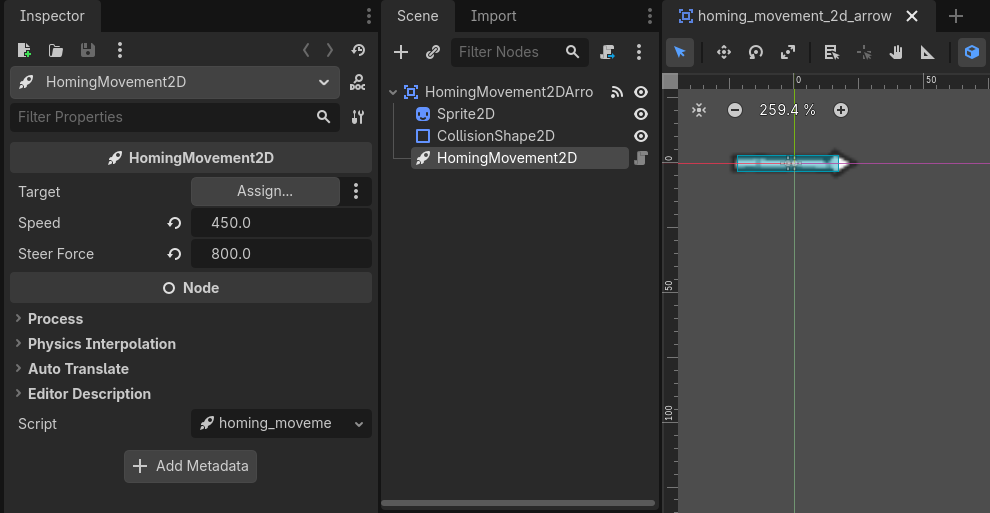
The HomingMovement2D component's speed and steer_force variables are set properly.
There is no other code needed here. The arrow itself is an Area2D which deletes itself after colliding with the enemy. This is done via the editor: the area_entered signal is connected to the root Node's queue_free() method.
That wraps up the HomingMovement2D component! :)