50 Components Course: Hitbox2D + Hurtbox2D
7 min read
Table of contents
Demo & Sources
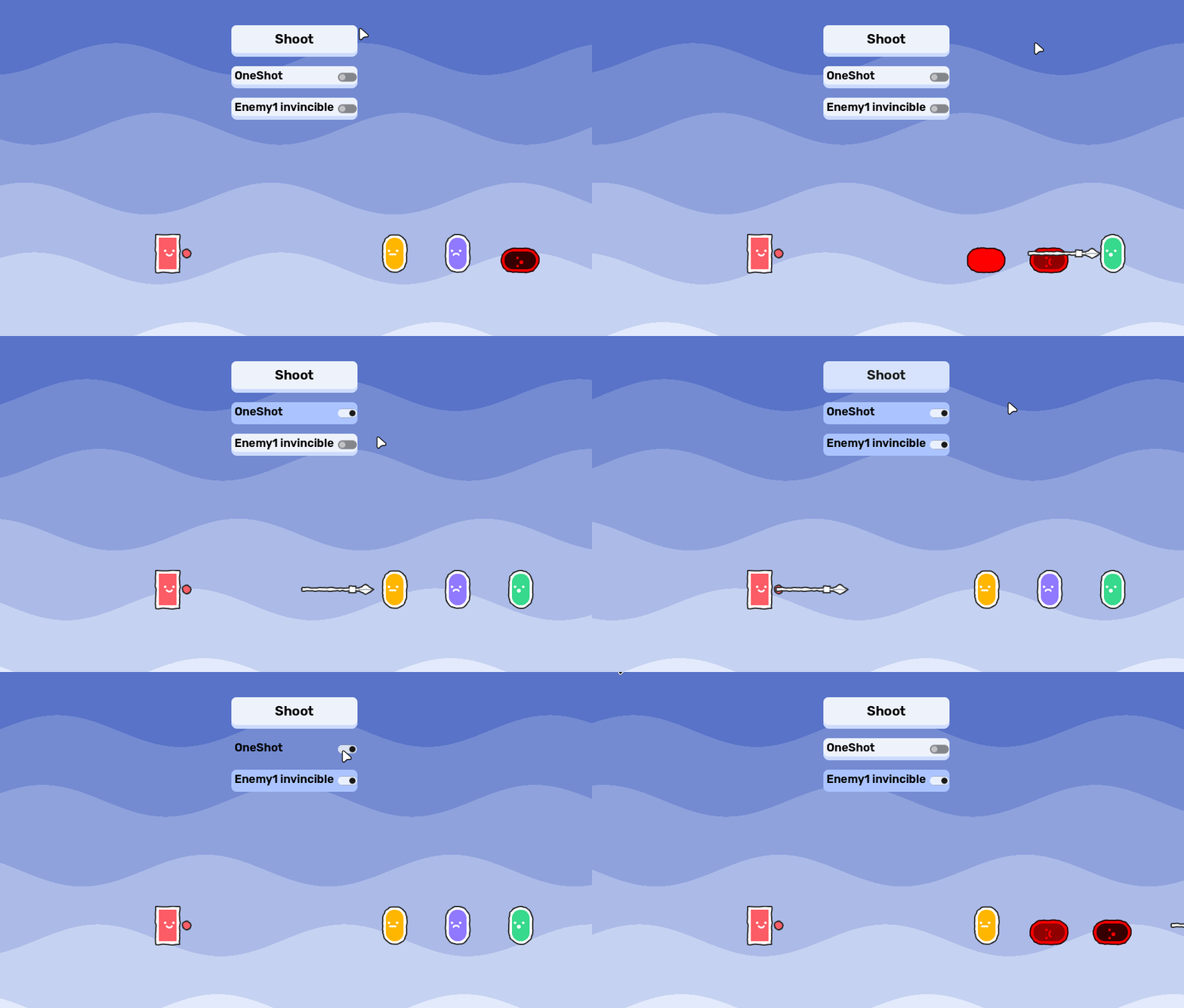
You can try it yourself live here.
The source code is available on GitHub:
Design
What is the best way to design a component? It can be a bit tricky to understand it at first, but here's a checklist:
- rule #1: it only does ONE thing!
- rule #2: it is generic, so you can use it for any game.
- rule #3: it has as little dependencies as possible.
- rule #4: it can be used from the outside, by its owner.
Enforcing rule #1 makes sure you do not overscope your components.
Rule #2 makes sure you can reuse your components, in- and outside your current game project. Compare a Sprite2D node and an RPG talent tree and skill system. Sprite2D does one thing, displays an image. You can use that for any 2D game to display images. The RPG talent tree and skill system is not a component because it is highly specific to RPG games.
Rule #3 helps keeping your components flexible. Fewer dependencies mean that the component can be used in different contexts. Too many dependencies often suggest a too specific use-case.
Rule #4 establishes a standard communication line in your component-based games. There are 3 main ways of communication.
- A component can notify the outside world of an event happening with a signal (outside world is almost always the owner)
- The owner of the component can use the components functionality through its public method(s).
- The owner of the component can affect the behaviour of a component through changing its properties.
To make the process of designing a component easier, ask these three questions.
What is the ONE thing this component does?
Hitbox2D
It detects hitting Hurtboxes, and delivers damage. This is the offensive part of a combat system.
Hurtbox2D
It registers hits from Hitboxes. This is the defensive part of a combat system.
What DATA the component needs to do its thing?
Hitbox2D
- damage value
boolflag for toggling one_shot:truemeans that the Hitbox2D can only hit once
Hurtbox2D
boolflag for toggling invincibility: set totruefor I-frames
How does it communicate with the outside world?
Hitbox2D
signal hit(hurtbox: Hurtbox2D) It emits a signal when the Hitbox2D hits a Hurtbox2D.
Hurtbox2D
signal hit_received(hitbox: Hitbox2D)
It emits a signal when a Hurtbox2D receives a hit.
Implementation
Hitbox2D
@icon("hitbox_2d.svg")
class_name Hitbox2D
extends Area2D
First, a custom icon is provided which makes the component feel like it is part of the Godot eco system when you add it to the SceneTree.
Finally, a custom class_name is set and the class is extended from the Area2D class.
You can read more about the @icon annotation here.
signal hit(hurtbox: Hurtbox2D)Then, the signal for communicating is defined. It will be emitted when the Hitbox2D hits a Hurtbox2D.
@export var damage: float = 1.0
@export var one_shot: bool = false
Then, two export variables are defined. The first is amount of damage to be dealt to Hurtbox2Ds.
one_shot is more interesting: if true, this hitbox will only land a hit once. Useful for projectiles or single-hit strikes to prevent damaging multiple targets or the same target twice in one frame.
var _has_hit: bool = falseThen, an internal flag is defined. It is used to track if a hit has already been landed.
func _init() -> void:
	monitoring = true
	monitorable = false
	area_entered.connect(_on_area_entered)
Inside _init(), the monitoring and monitorable properties are set up accordingly: Hitbox2Ds can track Hurtbox2Ds entering their space but not vice versa.
Finally, a callback method is connected to the area_entered signal.
func reset() -> void:
	_has_hit = false
Then, a reset() method is defined. It can be called to reset a one_shot hitbox, allowing it to hit again.
func _on_area_entered(area: Area2D) -> void:
	if not area is Hurtbox2D:
		return

	var hurtbox := area as Hurtbox2D
	var already_hit := one_shot and _has_hit

	if already_hit or hurtbox.is_invincible:
		return

	_has_hit = true
	hurtbox.take_hit(self)
	hit.emit(hurtbox)
A safeguard is provided first: if the entering area is not a Hurtbox2D, we can return early. Then, the area parameter is converted to a Hurtbox2D to provide auto-completion. Also, an already_hit bool flag is defined to handle one_shot Hitbox2Ds.
Then, a second safeguard is defined. If the Hitbox2D is one_shot and it aleady hit something, OR if the Hurtbox2D is currently set to invincible, we can return early.
Finally, if neither of the safeguards activated, three steps are executed:
- The
_has_hitinner flag is set to true. - Then, the Hurtbox2D's
take_hit()method is called, so it can register taking this hit. - Finally, the Hitbox2D can emit the
hitsignal, passing the hurtbox as a parameter.
Hurtbox2D
@icon("hurtbox_2d.svg")
class_name Hurtbox2D
extends Area2D
First, a custom icon is provided which makes the component feel like it is part of the Godot eco system when you add it to the SceneTree.
Finally, a custom class_name is set and the class is extended from the Area2D class.
You can read more about the @icon annotation here.
signal hit_received(hitbox: Hitbox2D)
Then, the signal for communicating is defined. It will be emitted when the Hurtbox2D registers taking a hit from a Hitbox2D.
@export var is_invincible: bool = falseThen, an export variable is defined. When true, the hurtbox will ignore all incoming hits.
This can be used for "I-frames" (invincibility frames) after taking damage or during specific character states like rolling or dashing.
func take_hit(hitbox: Hitbox2D) -> void:
	if is_invincible:
		return

	hit_received.emit(hitbox)
Finally, there is a public method for registering a hit from a Hitbox2D. This is called by the Hitbox2D when it enters this area.
There is a safeguard first: if the is_invincible flag is true, we return early and do not register the hit. Otherwise, the hit_received signal is emitted so taking a hit can be handled by other components.
Example Use Case
Take a look at this Scene setup:
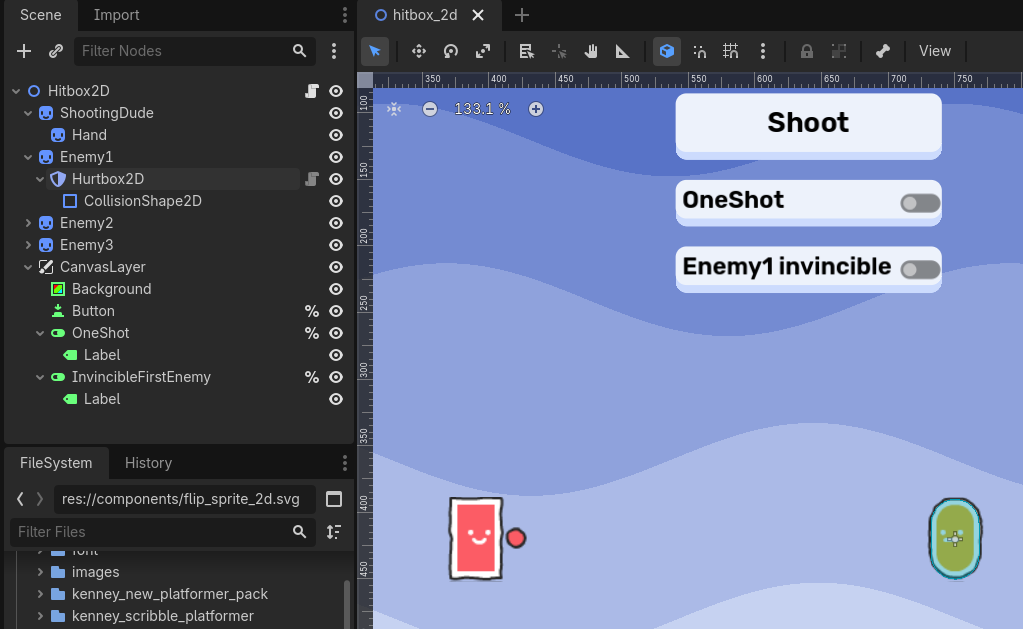
The red character (ShootingDude) can shoot spears with the button. Also, there are two toggles: one makes the spears one_shot, the other one turns the first enemy character invincible.
extends Node2D

@export var spear_scene: PackedScene

var one_shot: bool = false
Two variables are defined: one for the spear spawning, and one flag for tracking the one_shot toggle.
func _ready() -> void:
	%Button.pressed.connect(_spawn_spear)
	%OneShot.toggled.connect(func(enabled): one_shot = enabled)
	%InvincibleFirstEnemy.toggled.connect(
		func(enabled):
			$Enemy1/Hurtbox2D.is_invincible = enabled
	)

	$Enemy1/Hurtbox2D.hit_received.connect(_on_enemy_hit.bind($Enemy1))
	$Enemy2/Hurtbox2D.hit_received.connect(_on_enemy_hit.bind($Enemy2))
	$Enemy3/Hurtbox2D.hit_received.connect(_on_enemy_hit.bind($Enemy3))
Inside _ready(), we connect everything together:
- The button press is connected to a callback method for spawning spears.
- The toggles are connected to changing their respective boolean flags.
- Finally, all enemy hurtboxes
hit_receivedsignals are connected to a callback method.
func _spawn_spear() -> void:
	var new_spear := spear_scene.instantiate()
	add_child(new_spear)
	new_spear.one_shot = one_shot
	new_spear.global_position = $ShootingDude/Hand.global_position
The spawn_spear() method is pretty straightforward: instantiate it at the right position, passing in the current state of the one_shot toggle.
func _on_enemy_hit(_hitbox: Hitbox2D, enemy: Node2D) -> void:
	enemy.modulate = Color.RED
	enemy.rotation_degrees = -90
	enemy.position.y = 430
	await get_tree().create_timer(1).timeout
	enemy.rotation_degrees = 0
	enemy.position.y = 420
	enemy.modulate = Color.WHITE
When the enemies are hit, they will:
- turn red for one second,
- "lay down" (rotating by -90 degrees),
- and their Y position will be adjusted to make it look good
- after 1 second, everything is reset to its previous state.
The spear is a separate scene, with the following setup:
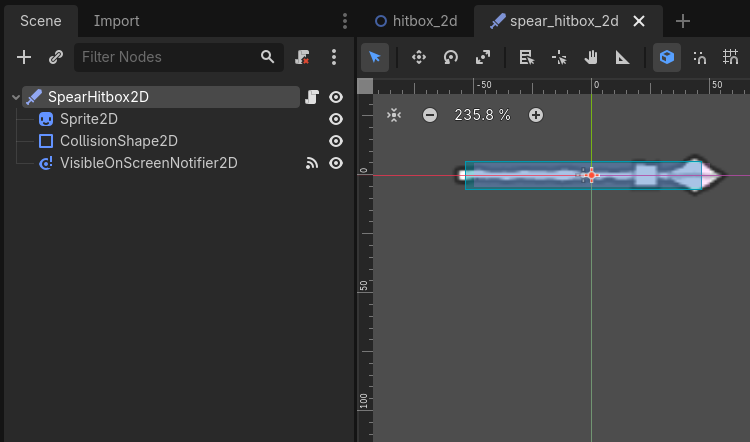
The code is as easy as it can be:
extends Hitbox2D

@export var speed := 400


func _physics_process(delta: float) -> void:
	position += Vector2.RIGHT * speed * delta
These components are pretty much the bread and butter for all 2D games with damage/health mechanics. They can be combined with other useful components, like Stats and Modifiers later down the line.
That wraps up the Hitbox2D + Hurtbox2D components!